Xylo Kerf Get the app

Cut list optimizer for iPhone and iPad

Measurements in.
Cutting plan out.

XyloKerf lays out your parts on plywood, MDF and boards with the blade kerf, grain direction and trim margins accounted for. Then it walks you through every rip and crosscut in order.

Download on theApp Store

Free for up to 3 active projects. No account needed. For iPhone and iPad with iOS 17 or later.

Project
Garage cabinet
Stock
3/4" birch ply, 48" × 96"
Parts on sheet 1
7
Saw cuts
11, kerf 1/8"
Key
PartRotated partOffcut
Cutting layout for one 48 by 96 inch sheet of birch plywood: two cabinet sides, a bottom, two shelves and two top stretchers, with 11 saw cuts.
Cut 1 of 11Crosscut

Crosscut 34 1/2" from the top edge for Left side 1; keep the kerf past the part (48" cut).

48" cut · kerf 1/8"

Example: sheet 1 of a garage cabinet, with the cut instructions XyloKerf gives at the saw. Cut pieces slide apart so you can see each one.

How it works

From a list of parts to the first cut.

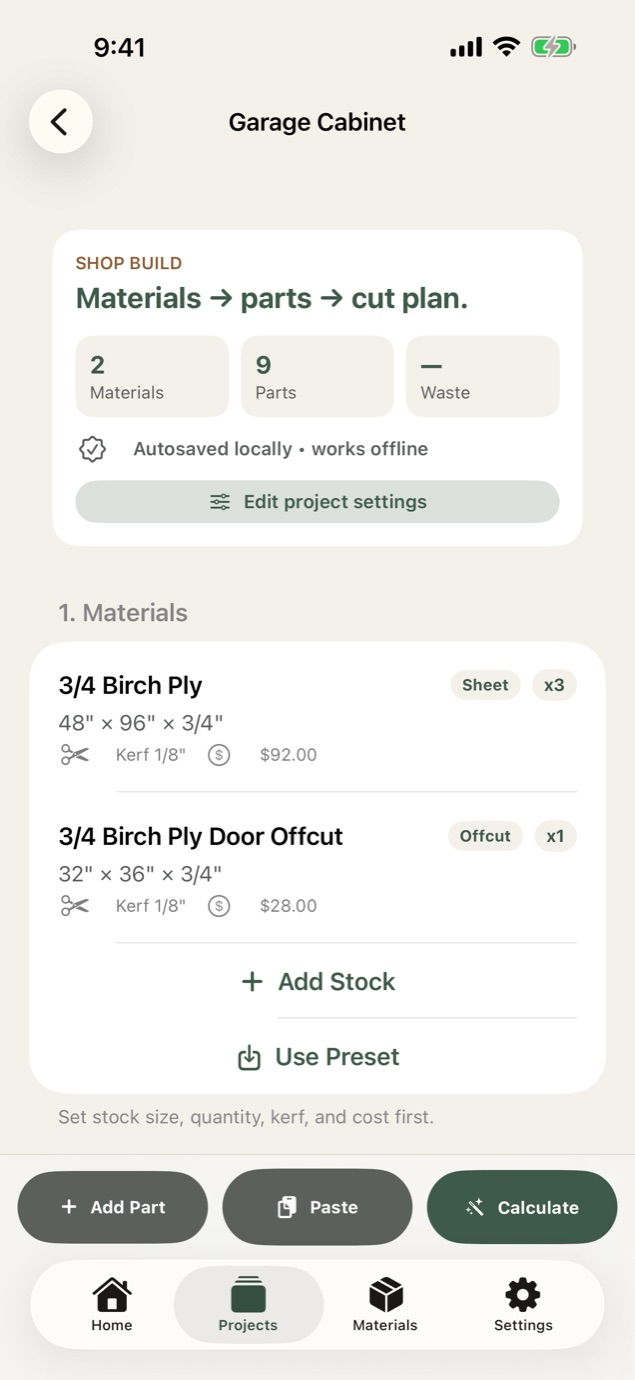
  1. XyloKerf project screen for a garage cabinet, listing two birch plywood materials with size, kerf and cost.

    Step 1

    Enter your stock and parts

    Add sheets, boards and offcuts with size, quantity, kerf and cost. Then type your parts in, paste a list, or import a photo of a written cut list. You review every row before it's added.
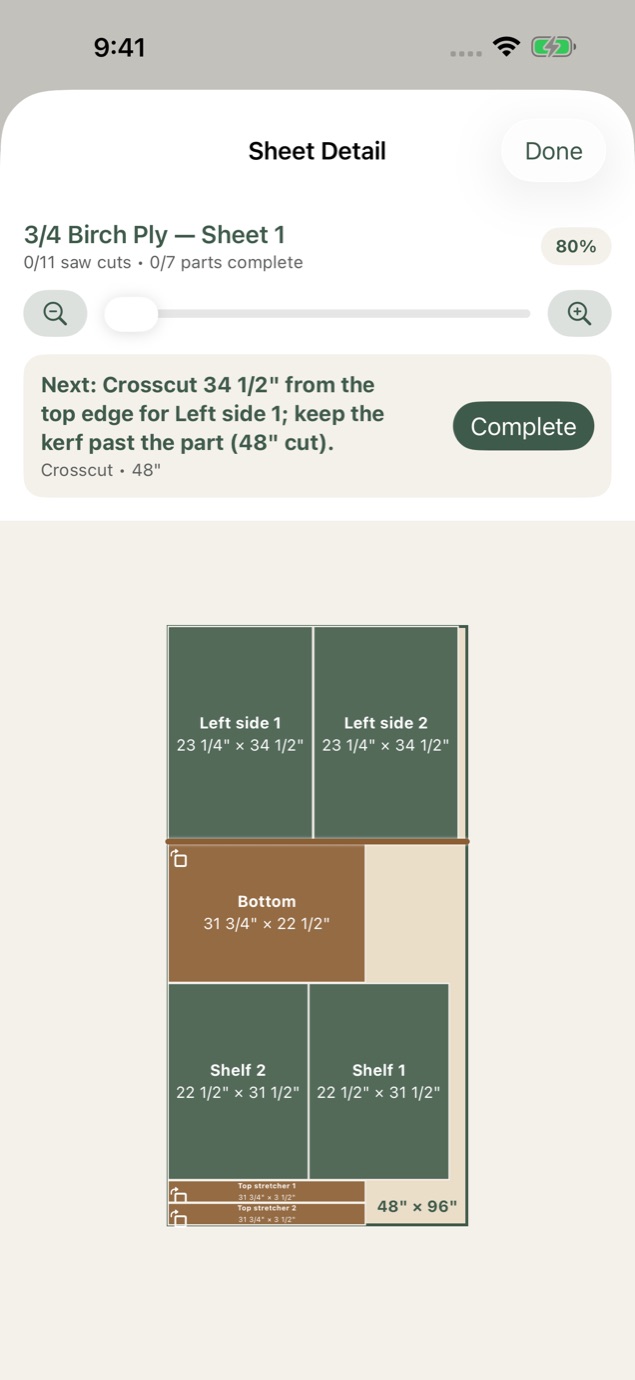
  2. XyloKerf sheet detail showing cabinet parts laid out on a 48 by 96 inch plywood sheet, with the next crosscut highlighted.

    Step 2

    Get the layout

    XyloKerf tries several layout strategies and keeps the one that uses your stock best. If a part can't fit, it tells you which one and why.
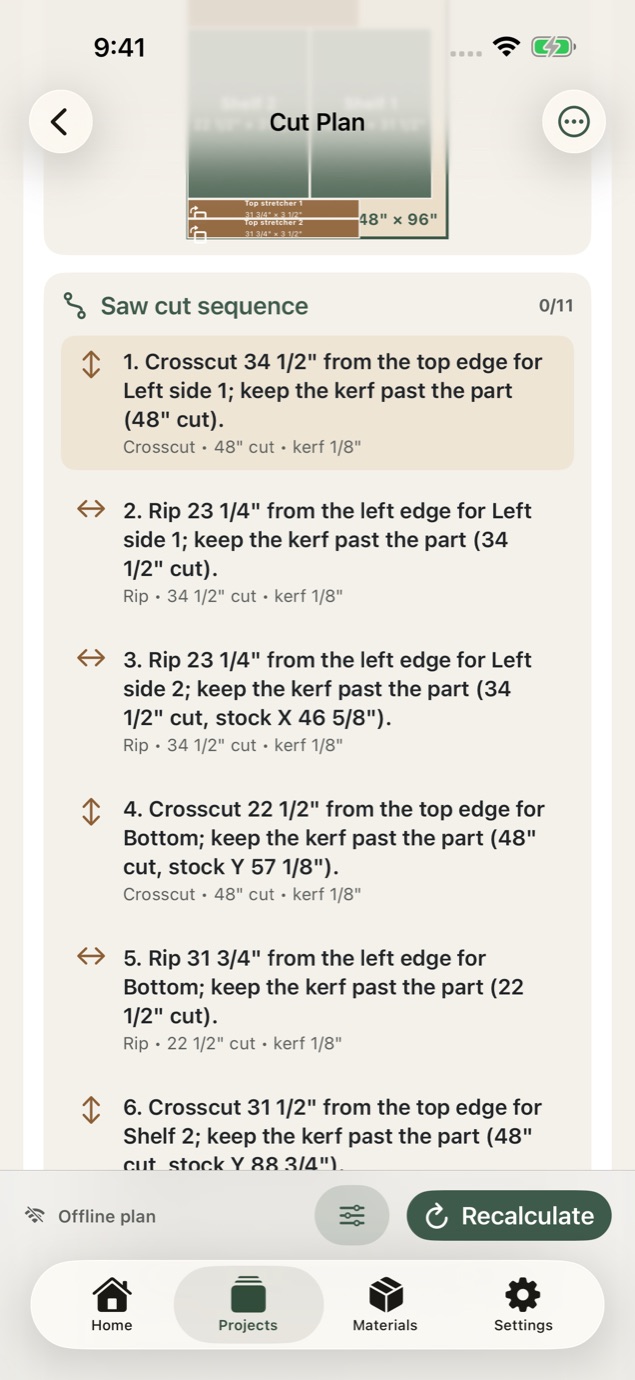
  3. XyloKerf saw cut sequence listing numbered crosscut and rip instructions with cut lengths and kerf.

    Step 3

    Cut in order

    Follow numbered trim, rip and crosscut steps and check them off as you go. Your progress is saved, so you can stop for the day and pick up at the next cut.

3D table saw preview

Watch every cut before you make it.

Each sheet's cut sequence plays on a 3D table saw. The workpiece turns between rips and crosscuts, feeds through the blade, and the part comes free with the kerf left behind.
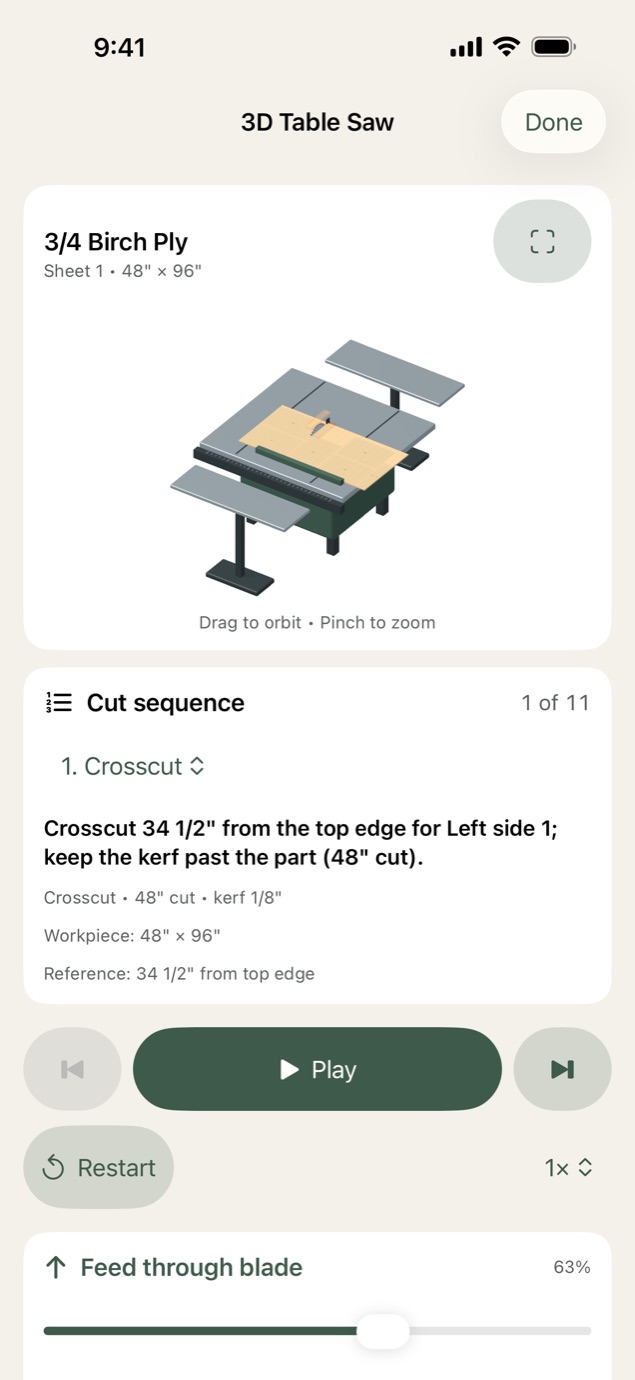
  • PlayRun the sheet from the first cut to the last, at the speed you pick.
  • ScrubDrag the feed slider to move the board through the blade.
  • StepGo forward or back one cut at a time.
  • OrbitDrag to turn the saw around and pinch to zoom in.
XyloKerf 3D table saw preview with a birch plywood sheet on the saw and the first crosscut of 11 ready to play.

Built around real stock

Layouts that respect your shop.

1/8" 1/8" 1/8" 1/8"

Kerf drawn wider than scale.

Four rips with a 1/8" blade turn half an inch of plywood into sawdust. XyloKerf leaves room for every kerf, so the last part off the sheet still comes out full size.

Kerf
Set your blade's kerf for each material.
Grain
Lock grain direction on parts that show, so they stay aligned with the sheet.
Rotation
Let plain parts turn when that fits more on a sheet.
Trim
Take the factory edges off before the first cut.
Edge banding
Mark banded edges and add notes. They follow the part onto the plan, the checklist and exports.
Stock
Plywood, MDF, sheet goods, dimensional boards and offcuts, with quantity and cost.
Units
Inches, fractions or millimeters.
Fit checks
When a part can't fit, you get a clear warning that says why.

Privacy

No account. No ads. No tracking.

Stays on your device

Projects are planned and saved on your iPhone or iPad, and the planner works offline in the shop.

Backups you control

Back up and restore your projects through Files or iCloud Drive.

Private photo import

Text recognition only sees the photo you choose, and it runs on your device.

Pricing

Start free. Go Pro when the shop gets busy.

Free

$0

The complete planner

No account needed.

  • Up to 3 active projects
  • Every layout and cut-sequence feature
  • 3D table saw preview
  • A sample project that doesn't count toward your 3
  • Backup and restore through Files or iCloud Drive
Download free

XyloKerf Pro

$39.99per year

That's $3.33 a month. Or pay $4.99 monthly.

Try it free for 7 days with the yearly plan.

  • Everything in Free
  • Unlimited active projects
  • Printed shop packets with measurements, warnings and checklists
  • PDF shop packets and CSV cut lists
  • SVG and DXF files for CAD and CNC

Upgrade from inside the app whenever you need it.

US prices. Prices are shown in the app before you buy and may vary by country or region. The free trial is for eligible new subscribers. XyloKerf Pro is an optional auto-renewable subscription that renews unless canceled at least 24 hours before the end of the current period. Manage or cancel it in your App Store account settings.

Cut smarter before the first board moves.

Download on theApp Store

Free on iPhone and iPad. Requires iOS 17 or later.